Get more out of your Thermomix® or Monsieur Cuisine® with RezepteMix
RezepteMix helps you make any recipe with your Thermomix® or Monsieur Cuisine® – no matter where it comes from: website, blog, cookbook, Instagram, Pinterest. Quantities, speeds and times match your device directly.
And because recipes otherwise end up scattered everywhere, RezepteMix also collects them as a digital cookbook in one place, even without a kitchen machine.


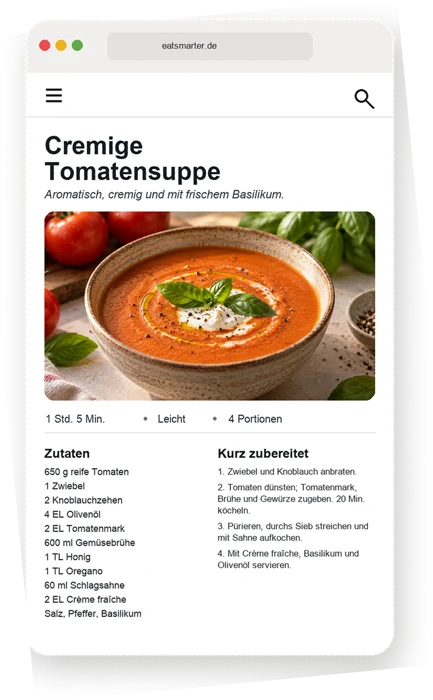
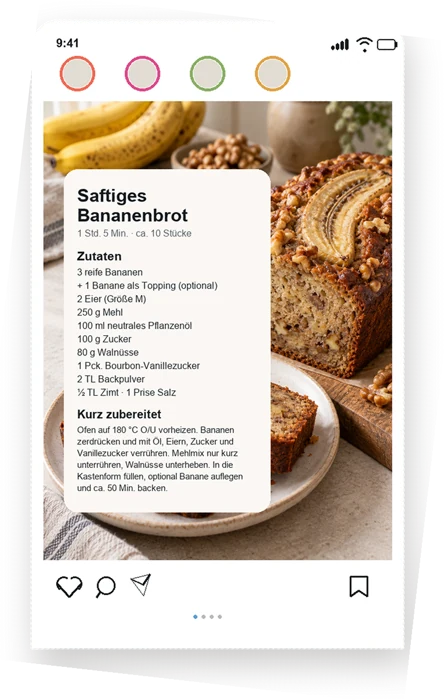
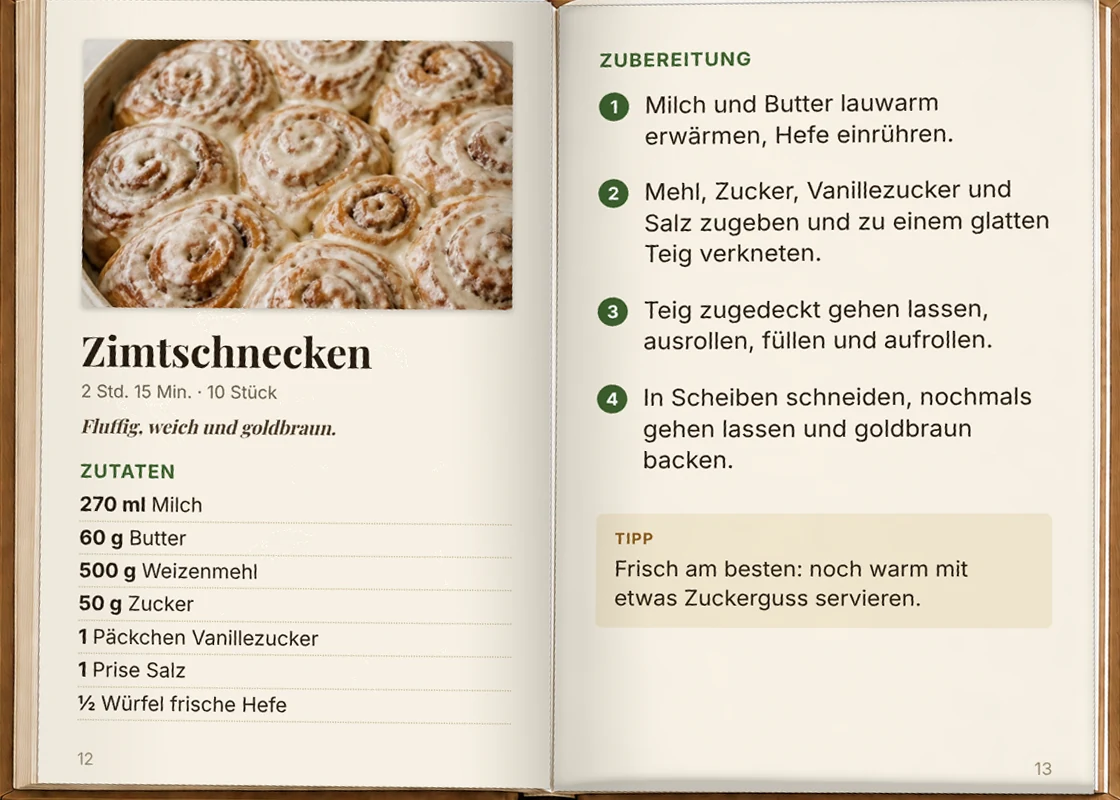
Example: the original step "Melt butter in a pot" becomes, for the Thermomix®, "2 min/37°C/speed 1, heat until the butter has melted".
How it works
Recipe in. Thermomix®-ready out.
It doesn't matter where you found a recipe – RezepteMix takes it in any form.
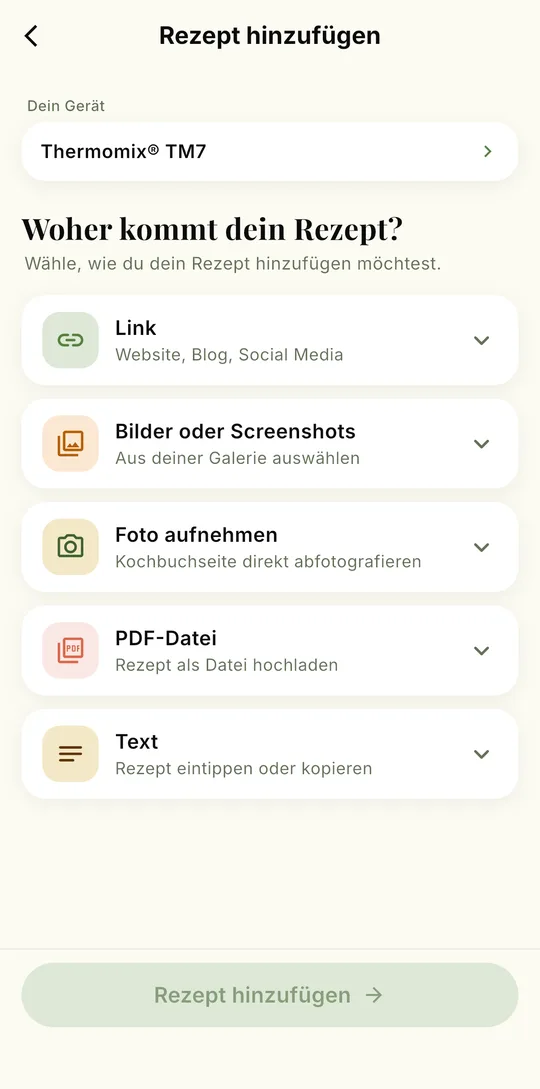
Add
Link, photo, screenshot, PDF or text – your recipe, in the form you found it.
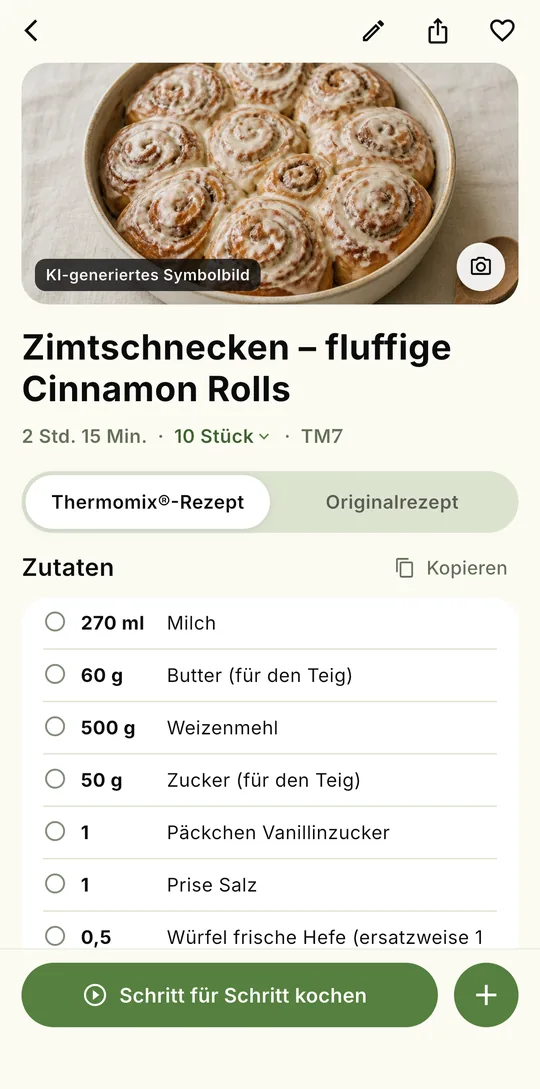
Convert
RezepteMix recognizes the ingredients and steps and turns them into a Thermomix® version – the original is kept.
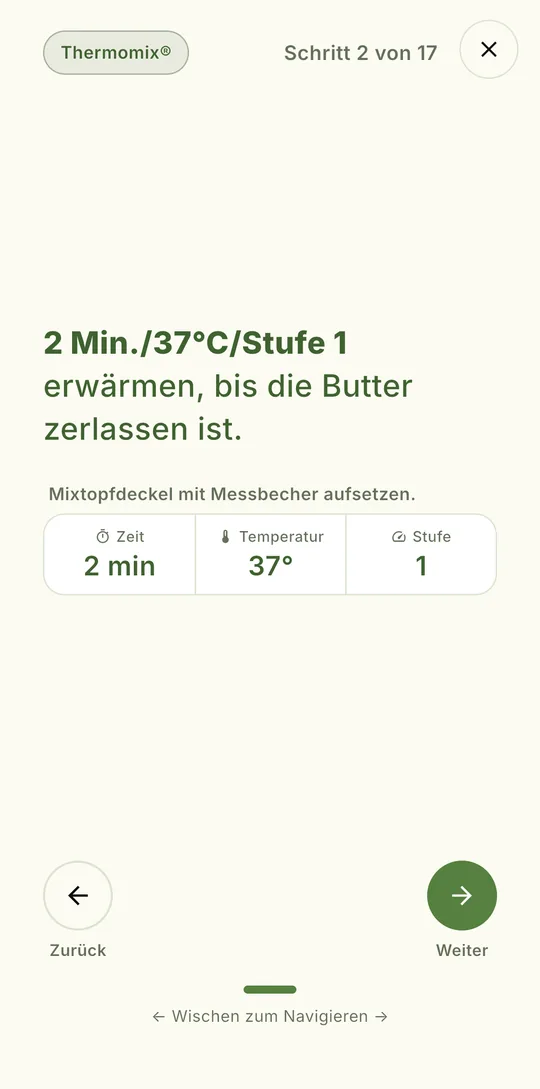
Cook
Cooking mode calmly guides you through every step, with time, temperature and speed at a glance.
Via link
Found a recipe online, for example on a food blog? Paste the link, done. RezepteMix reads the page itself.
Via photo
A recipe from a printed cookbook or a recipe card? Take a photo – RezepteMix recognizes ingredients and instructions straight from the image.
Via screenshot
Saw a recipe in an Instagram story or a reel? A screenshot is enough.
Via PDF
The recipe is a PDF file, for example as a download? Select the file and add it.
Via text
The recipe is already text, say in a note or a WhatsApp message? Just paste it in.
In every case the same thing happens next: RezepteMix recognizes the ingredients and preparation steps and automatically converts them into a Thermomix®-ready version – with matching quantities, speeds and times for your device. More on this in the guide to converting, the guide to digitizing and, if the recipe comes from your feed, the guide to recipes from social media.
Which devices
Convert recipes for Thermomix® and Monsieur Cuisine®
You choose your device once, and RezepteMix converts every new recipe for it. You can change the selection in the settings at any time.
Thermomix® TM5, TM6 and TM7
Recipes with time, temperature and speed for your model, with a fill-level check and notes in the recipe.
Monsieur Cuisine® Connect, Smart, Plus and Compact
Its own rules for each model, including the fill level of the mixing bowl, instead of a Thermomix® approximation.
No device
Just save the original recipe: your digital cookbook, even without a kitchen machine.
Example
A classic tiramisu becomes a Thermomix® version
This is what it looks like in practice. Tiramisu makes a good example because the butterfly whisk, reverse and a clean mixing bowl for the beaten egg whites all matter here – details you never have to think about by hand.
Original recipe
Ingredients
4 egg yolks, 2 egg whites, 100 g icing sugar, 2 tbsp amaretto, 500 g mascarpone, 200 g ladyfingers, 3 cups coffee (cooled), cocoa powder
Preparation
Whisk the egg yolks and icing sugar until creamy, stir in the amaretto and mascarpone. Beat the egg whites until stiff and fold in gently. Briefly dip the ladyfingers in the coffee, lay them in a dish and cover with cream until everything is used up. Chill for several hours and dust with cocoa before serving.
Your Thermomix® version
- Insert the butterfly whisk. Add the egg yolks and icing sugar to the mixing bowl and whisk until creamy for 4 min / speed 44 min Speed 4
- Stir in the amaretto for 10 sec / speed 3, then remove the butterfly whisk and gently stir in the mascarpone for 20 sec / reverse / speed 220 sec Speed 2
- Transfer the cream, rinse the mixing bowl and dry it well
- Insert the butterfly whisk, beat the egg whites until stiff on speed 3.5 without a set time – stay by the device until the sound becomes dullerSpeed 3.5
- Fold in the beaten egg whites, then layer the soaked ladyfingers alternately with the cream in a dish
- Chill for 4 hours (ideally overnight) and dust with cocoa before serving
You don't have to convert anything yourself or look up which speed and temperature are meant for what. Both versions – original and Thermomix® version – stay in your cookbook, in case you ever want to cook without the device. Whether tiramisu, bolognese or a classic potato salad: the principle is the same for every recipe.
Why RezepteMix
Your digital cookbook, just the way you want it
Cook freely
RezepteMix turns every recipe you find anywhere into your Thermomix® version – online, in a cookbook or from friends. This works whether or not you also use Cookidoo®.
Sorted automatically
One recipe saved on Instagram, one as a screenshot, one on a slip of paper in the kitchen drawer? RezepteMix collects everything in one place and automatically sorts each recipe into a category. You create your own cookbooks like Meal Prep, Kids or Vegan yourself.
Cook without searching
Cooking mode calmly guides you step by step through the recipe. The quantities are shown right in the step: you don't have to search for where you were or how much of an ingredient is needed.
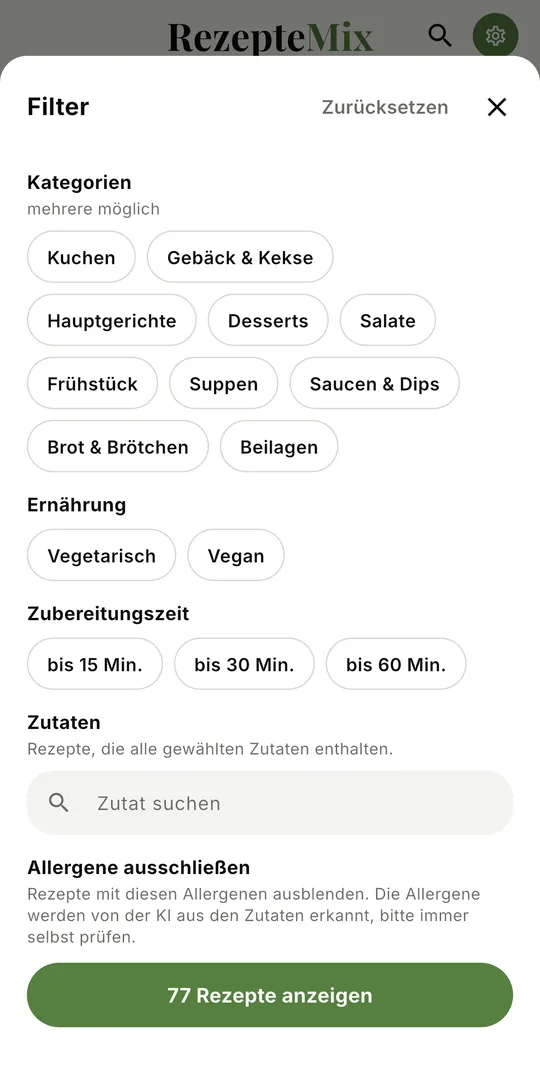
Filters & cookbooks
Find the right recipe more easily
Every recipe you add is automatically sorted into a category by RezepteMix, for example main dishes, soups or desserts. That makes it easier to find the right recipe again.
- Categories: several at once, too
- Diet: vegetarian or vegan
- Preparation time: up to 15, 30 or 60 minutes
- Ingredients: recipes that contain all the ingredients you select
Want to organize by something else, for example by meal prep? Then create your own cookbooks and sort your recipes into them.
Your cookbook, finally in one place.
RezepteMix is now available for iPhone and Android: on the App Store and Google Play. Download the app and add your first recipe.
Guides
More know-how about converting
Converting recipes for the Thermomix®: how to get it right
What matters when you convert a recipe: order of steps, time, temperature, speed and fill quantity.
Thermomix® TM5, TM6 or TM7: recipes for your model
Why the model matters and how to set it once in RezepteMix.
Digitising recipes: cookbook, photo, screenshot and link
A cookbook page, an Instagram story or a food blog: how every recipe ends up in one place.
Turning a photo of a recipe into a Thermomix® recipe
Photograph a cookbook page, read out the recipe, have it converted for your device.
Converting a food blog recipe for the Thermomix®
Paste the link, have it converted, cook: how a blog recipe becomes a version for your device.
Create a digital cookbook: save, organise and cook recipes
Save, organise and cook recipes: a digital cookbook, even without a food processor.
Convert recipes for Monsieur Cuisine®: Connect, Smart, Plus and Compact
Connect, Smart, Plus or Compact: how to convert a recipe for your model.
Save recipes from social media: Instagram, YouTube and Pinterest
Link, share menu, screenshot or text: how recipes from your feed end up in your cookbook.
Frequently asked questions
How does RezepteMix work?
You add a recipe via a link, photo, screenshot, PDF or text. RezepteMix recognizes the ingredients and preparation steps and automatically converts them into a version you can cook straight away with your device, with matching quantities, speeds, times and temperatures. You can choose between Thermomix® and Monsieur Cuisine®.
Which devices does RezepteMix support?
Thermomix® TM5, TM6 and TM7 as well as Monsieur Cuisine® Connect, Smart, Plus and Compact. You choose your device once, and new recipes are converted for it. If you have no kitchen machine or a different one, you select "No device".
Which recipes can I add?
Any recipe you find anywhere: online on a food blog, in a printed cookbook, on a recipe card, in an Instagram story, as a PDF file or as text from a note or WhatsApp message.
Can I add recipes from Instagram, YouTube or Pinterest?
Yes. On Instagram and YouTube, RezepteMix reads the post's description if the recipe is written there as text. If it's only in the image or video, a screenshot helps. On Pinterest, RezepteMix follows the pin's link to the recipe page.
Can I use RezepteMix without a Thermomix® or Monsieur Cuisine®?
Yes. With the "No device" option you save recipes as a digital cookbook, with ingredients, steps, categories, favorites, your own cookbooks and cooking mode, but without device settings.
Is RezepteMix free?
The first 3 conversions are free. After that there are credits or a subscription. The prices are in the next question and in the app.
What does RezepteMix cost?
Adding and collecting recipes is free; you only pay for the conversion. With credits you pay per use: 1 credit costs 0,99 €, 5 credits cost 4,99 €, 10 credits 8,99 € and 20 credits 14,99 €. A conversion for a kitchen machine costs one credit, a conversion without a kitchen machine ("No device") costs half a credit. You're only charged when the conversion succeeds, and credits don't expire. With a subscription you convert without credits: RezepteMix Plus for all supported devices costs 2,99 € per month or 29,99 € per year, RezepteMix Collection for use without a kitchen machine only costs 1,99 € per month or 19,99 € per year. The subscriptions have a usage limit of up to 300 conversions per billing month. You can cancel subscriptions at any time in the settings of your Apple Account or on Google Play. Prices may vary by country; the price on the App Store or Google Play is the one that applies.
Can I use RezepteMix even if I have Cookidoo®?
Yes, that works independently. RezepteMix turns every recipe you find elsewhere into your Thermomix® version – whether or not you also use Cookidoo®.
How do I get a converted recipe into my Cookidoo® creation?
Automatic transfer isn't technically possible, because Cookidoo® doesn't offer an official interface for it. Copying still makes it easy: copy the ingredients and steps in RezepteMix and paste them into Cookidoo®.
Is RezepteMix officially affiliated with Thermomix®, Monsieur Cuisine®, Vorwerk or Lidl?
No. RezepteMix is an independent product and has no business connection to Vorwerk or Lidl. We use the terms "Thermomix®" and "Monsieur Cuisine®" purely descriptively, to show which devices the recipes are compatible with.
When is RezepteMix available?
RezepteMix is available as an app for iPhone and Android: on the App Store and Google Play. If you have questions, write to us at support@rezeptemix.app.
Is RezepteMix available for Android too?
Yes, RezepteMix is available for Android on Google Play. You'll find the app in the Google Play Store.
Legal & information
You'll find all legal information about RezepteMix and Em Cha International UG (haftungsbeschränkt) on their own pages.
Legal texts are currently available in German only.